A new employee can learn a lot from a single video. But should that video explain your company culture, teach them how to use your software, walk them through a work process, or all three? That’s where onboarding and training videos can get confusing.
Onboarding is usually about helping someone understand the company and settle into their new role, while training is more focused on building the knowledge or skills they need to do specific tasks.
There’s some overlap, but the purpose behind each one is different. And that difference should shape what you put into the video.
What Is the Difference Between an Onboarding Video and a Training Video?
An onboarding video helps new employees understand the company, their role, and what to expect as they get started. A training video focuses on teaching a specific skill, process, tool, or piece of knowledge employees need to do their work.
| Onboarding Video | Training Video | |
| Purpose | Introduce | Teach |
| Focus | Company & role | Skills & tasks |
| Audience | New employees | New & existing employees |
| Content | Culture, teams, expectations | Tools, processes, procedures |
| Timing | Start of employment | As needed |
| Goal | Understand the workplace | Do the job or specific tasks |
The easiest way I think about it is the stage of the employee journey.
An onboarding video usually comes first. It gives someone enough context to feel oriented before they get into the details of their actual work. It might introduce the company, explain the culture, show how teams work together, or walk a new hire through what their first few days will look like.
Training videos have a narrower job. They are there because an employee needs to learn something specific.
For example, a new sales employee might watch an onboarding video about the company and its sales team. Later, they might watch a training video on how to use the CRM, qualify leads, or handle a particular type of customer conversation.
The same person can need both.
Employee Onboarding Is About Getting Started
Think of onboarding as the employee’s introduction to the organization.
It answers questions such as:
- How does this company work?
- What should I know about the culture?
- Who will I be working with?
- What should I expect during my first few weeks?
- Where do I go when I need help?
An employee onboarding video checklist might therefore include company introductions, team structures, workplace expectations, communication practices, and other information that helps someone find their footing. Here’s an example from APEX. The CEO welcomes new employees, introduces what they can expect from their onboarding experience, and sets the tone for their first days with the company.

It doesn’t have to explain every detail of the job.
In fact, trying to do that can make an onboarding video unnecessarily long. A new employee already has plenty to take in during their first days.
Employee Training Is About Learning How to Do Something
Training usually becomes more specific.
A company might create training around a particular software, internal process, product, safety procedure, customer interaction, or technical skill. The employee should finish the training with a clearer understanding of how to perform a task or apply what they’ve learned.
The need for ongoing learning is also becoming harder to ignore. LinkedIn Learning’s 2025 Workplace Learning Report found that 91% of L&D professionals believe continuous learning is more important than ever for career success.
There are many types of employee training videos, too. A software walkthrough will look very different from a compliance training video or a product demonstration.
The format should follow the subject.
For example, a screen recording may make sense when you’re teaching employees how to navigate a new platform. An animated video can be useful when the subject involves a complicated process or something that’s difficult to demonstrate on camera.
Here’s an example of a training videos we made, combining animated characters with screencast animation:

Employee Onboarding vs Employee Training: How They Can Overlap
The distinction isn’t always perfectly clean.
A company might include a short explanation of its sales process in an onboarding video. That’s still onboarding if the goal is to give the new employee context about how the business operates.
Later, the same employee might receive a much more detailed training video showing exactly how to follow that sales process.
The difference is less about the topic and more about what the employee needs from the video.
That’s also why I don’t think every employee video needs to be treated as a big production. Sometimes a simple recording is enough. Other times, the subject needs more structure and visual explanation.
And yes, this matters if you work with a video production studio. Before thinking about animation, voiceover, or visual style, I’d want to know what the employee actually needs to understand.
A polished video can still be one of those boring corporate videos if it contains too much information and doesn’t have a clear purpose. The goal is clarity first.

When Should You Use an Onboarding Video or a Training Video?
Use an onboarding video when employees need context about the company and their new role, and use a training video when they need to learn a specific task, process, or skill. If the two goals overlap, you can use both videos at different points in the employee journey.
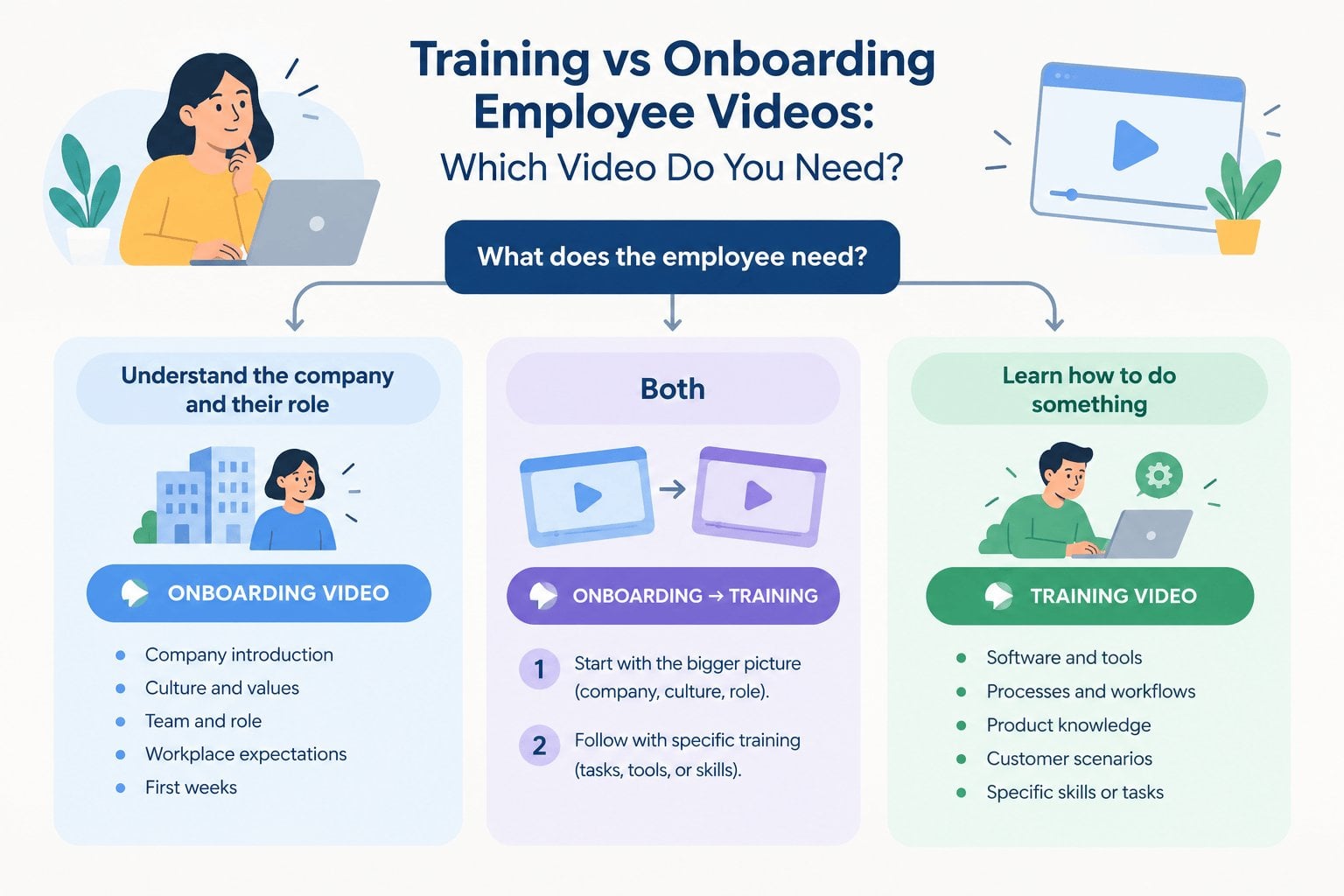
The easiest way to decide is to look at what you want the employee to take away from the video.
When an Onboarding Video Makes More Sense?
An onboarding video works well when someone is still figuring out where they fit into the company. They don’t need to know everything yet. They need enough context to understand how the organization works and what their role looks like within it.
That distinction matters because onboarding is still an area where many companies have room to improve. Gallup found that only 23% of employees strongly agree that their onboarding process was exceptional, suggesting that simply having an onboarding process doesn’t necessarily mean employees are getting a great start (Gallup – Employee Experience, 2025)
An onboarding video might cover:
- A quick introduction to the company
- Company culture and values
- How different teams work together
- Workplace expectations
- Communication practices
- What to expect during the first few weeks
- Where employees can find important information
For a remote employee, you might also explain how the team collaborates, which tools they use, and where important information lives.
Keep the first impression simple.
I also think onboarding videos are a good opportunity to make the company feel more approachable. A new employee is going to encounter plenty of formal documents and HR forms. The video doesn’t need to sound like another one.
That’s particularly important when you’re thinking about employee inclusivity. If people are joining from different backgrounds, locations, or levels of experience, the content should be easy to follow without assuming everyone already understands the company’s terminology or internal habits.
When a Training Video Is More Useful?
Training becomes more relevant once there’s something specific the employee needs to learn.
For example, they might need to:
- Learn how to use a new software platform
- Follow a particular internal process
- Understand a product or service
- Handle a specific customer situation
- Follow a safety or compliance procedure
- Learn how to complete a recurring task
- Apply a technical skill
The signs you need training videos are usually pretty practical, too.
Maybe managers keep explaining the same process to different employees. Maybe employees repeatedly make the same avoidable mistakes. Or perhaps a new system has been introduced and everyone needs to learn how to use it.
That’s where video can become especially useful.
A good training video gives employees something they can return to when they need it. They don’t have to wait for their manager to become available or dig through a long document to find one particular instruction.
The format can vary, too.
For a software tutorial, a screen recording might be enough. For a complicated workflow, animation can make the sequence easier to understand. For customer service training, showing a realistic scenario may be more useful than simply listing the rules.
I wouldn’t force every subject into animation.
The production method should serve the lesson.
Employee Onboarding vs Employee Training: When You Might Need Both?
In many cases, onboarding and training work better as two separate steps.
Take a new employee joining a sales team. Their onboarding video could introduce the company, explain how the sales department fits into the business, and show what their first few weeks will look like.
The training can come afterward.
That second video might cover:
- How to use the CRM
- The company’s sales qualification process
- Product knowledge
- How to handle different customer scenarios
- The steps for handing a qualified lead to another team
The employee now has some context, so the more detailed material has somewhere to land.
This is also where online leearning videos can become part of a larger internal learning system. Instead of creating one giant video that tries to cover everything, companies can build a small library of shorter resources employees can access when they need them.
Shorter can be easier to maintain.
There is another benefit to separating the two. Onboarding content tends to change when the company changes its structure, culture, or internal policies. Training content may change because a tool, product, or process has changed.
Keeping them separate means you don’t necessarily have to replace everything when one piece of information becomes outdated.
Your Employees Shouldn’t Have to Figure It Out Alone
At Breadnbeyond, we treat employee videos as communication projects first and video projects second. When a company comes to us, we take the time to understand the audience, the context, and the message before we start thinking about scripts or visuals.
From there, we can help shape the content into something employees can actually follow. Depending on the subject, that might mean animation, character-driven storytelling, screen-based visuals, or a combination of different approaches.
We also keep the production process collaborative. Our team works with your subject-matter experts to turn internal knowledge into clear, usable content without expecting them to become scriptwriters or video producers themselves.
That matters because your employees already have enough to learn. The video should make their job easier, not add another layer of work.
FAQ: Employee Onboarding vs Employee Training
How long should an employee onboarding video be?
There is no fixed duration, but shorter videos are generally easier to finish and revisit. If the material starts getting too long, consider splitting it into several focused videos instead of putting everything into one.
Should onboarding videos be mandatory for new employees?
That depends on the information covered and how your onboarding program is structured. For important company-wide information, making the video part of the standard onboarding process can help ensure every new hire receives the same baseline information.
Can an employee training video replace live training?
Usually, it works better as a supporting resource. A video can handle consistent explanations and demonstrations, while live sessions can be reserved for discussion, practice, feedback, or situations that require individual guidance.
How often should employee videos be updated?
Review them whenever the information they contain changes. It’s also worth scheduling periodic reviews for topics that tend to evolve, so outdated instructions don’t quietly remain in your internal learning library.
How can companies measure whether an employee video works?
Completion rates can tell you whether people watched the content, but they don’t tell the whole story. Depending on the goal, you can also look at quiz results, task accuracy, support requests, employee feedback, or whether people can apply the information correctly afterward.