
Choose the training video format based on what your employees actually need to learn. Some topics need a simple explainer, while others are better suited to screen recordings, demos, simulations, or scenario-based videos.
That’s partly why learning and development remains a major investment for businesses. LinkedIn’s 2024 Workplace Learning Report found that 90% of global executives planned to increase or maintain their investment in L&D.
As a business owner myself, I don’t want my team sitting through long training videos just because that’s the format we’ve always used.
I want them to understand what they’re learning and actually remember it when they need it. That’s why I’d match the video format to the training goal.
Here are 10 employee training video types I’d consider for my business.
What Types of Employee Training Videos Can You Use in Your Business?
Employee training can cover everything from introducing a new hire to teaching employees how to handle a difficult customer or follow a security protocol. That’s why the same video format won’t necessarily work for every training goal.
1. Onboarding and Orientation Training Videos
The first few days at a new company usually come with a lot of information: who to meet, which tools to use, how things get done, and what the company expects from you.
An onboarding video can take some of that information off the manager’s plate while giving new employees something they can revisit whenever they need it.
These videos can introduce:
- The company, mission, and values
- Teams and key people
- Workplace policies
- First-week processes
- Internal tools and software
- Day-to-day workflows
They’re particularly useful for companies hiring frequently or onboarding remote and hybrid employees.
Instead of having someone repeat the same introduction every time a new employee joins, you can create a core video once and update it when something changes.
I’d also avoid putting everything into one long “Welcome to the Company” video.
A better approach is to create a short introduction, then break practical information into separate videos for tools, policies, workflows, and other topics.
2. Compliance Training Videos
Compliance training has an obvious problem, which is that people need to pay attention to information they may not find particularly exciting.
Video gives you another option. Instead of only explaining a rule, you can show what happens when someone follows it or doesn’t.
The same approach can work for data protection, workplace ethics, and safety procedures.
That’s where I think animation and storytelling are particularly useful. They can take something as dry as a policy document and turn it into a situation employees can actually recognize.
3. Cybersecurity Training Videos
Your employees are often the first line of defense against a cyberattack.
That makes cybersecurity training less about knowing technical terminology and more about recognizing what a threat looks like in everyday work. The format is especially useful here because you can show the threat instead of just describing it.
Training videos can walk employees through common situations such as:
- Spotting a phishing email
- Creating and protecting strong passwords
- Recognizing social engineering attempts
- Handling suspicious links and attachments
- Securing company devices
- Protecting sensitive data
- Using public Wi-Fi safely
4. Product and Technical Training Videos
When employees need to understand a product, software, or technical system, showing them how it works is usually more useful than giving them a manual to read.
These videos can be used to train employees adopting new software or teams learning about product updates.
The format can vary depending on what you’re teaching.
A screen recording works well for software, while an animated explainer video can simplify a complicated technical concept.
For physical products, a demonstration or step-by-step tutorial may make more sense.
I particularly like this format for complex products because you can control exactly what the viewer sees
5. Soft Skills Training Videos
Soft skills are difficult to teach because knowing what to do and actually doing it are two different things.
Take active listening. You can explain the concept in a presentation, but employees may understand it much better when they can see what good and bad active listening looks like in an actual conversation.
That makes video particularly useful for topics such as:
- Communication
- Conflict resolution
- Teamwork
- Emotional intelligence
- Time management
- Presentation skills
- Problem-solving
For example, a training video could show a manager handling a difficult conversation with an employee.
The video can then break down what worked, what didn’t, and how the conversation could have gone differently.
This scenario-based approach gives employees something concrete to relate to.
6. Leadership and Management Training Videos
Becoming a manager usually means learning a very different set of skills from the ones that made someone successful as an individual contributor.
That’s why leadership training needs to go beyond frameworks and management theory.
New managers need to see how those ideas translate into real decisions and conversations.
Training videos can cover topics such as:
- Giving feedback
- Delegating effectively
- Managing performance
- Coaching employees
- Handling difficult conversations
- Decision-making
- Building team culture
They’re particularly useful for new manager onboarding, leadership development programs, and internal promotion programs.
Here, I think scenario-based video has a clear advantage.
Instead of simply explaining how to give constructive feedback, for example, you can show a manager actually having that conversation, and then unpack what they did well and what they could improve.
That gives managers a chance to learn from a situation before they have to handle one themselves.
7. Health, Safety, and Emergency Training Videos
A written SOP can explain what employees should do, but a video can show the sequence, the equipment involved, and what the correct response looks like in emergency situations.
These videos can cover workplace safety procedures and equipment safety, fire evacuation, and PPE procedures.
For this type of training, I’d keep the format simple, such as demonstration, visual cues, and clear step-by-step instructions.
Employees can also revisit the video when they need a refresher instead of trying to remember every detail from a training session months ago.
Of course, video shouldn’t replace hands-on training or professional instruction when those are required.
For safety-critical procedures, it works best as a visual supplement to the training employees already receive.
8. Diversity, Equity, and Inclusion (DEI) Training Videos
Diversity and inclusion training videos can cover concepts that are difficult to communicate through definitions alone.
Unconscious bias, microaggressions, inclusive communication, and respectful workplace behavior can all feel abstract until employees see how they might appear in a real workplace.
A scenario could show a team meeting and highlight a moment where someone’s input is overlooked, or a comment crosses a line.
The video can then unpack what happened and give employees a better way to respond.
I think the strongest DEI training videos give employees something to discuss rather than simply telling them what the “right” answer is.
Stories and realistic situations can make the subject feel more relevant to their everyday interactions.
9. Process and Workflow Training Videos
Sometimes employees don’t need to understand a big concept. They just need to know what to click, what to do next, and what happens after that.
A screen recording or software walkthrough can show the exact process while employees follow along.
For physical or more visual processes, animation or a step-by-step demonstration may work better.
You can use them to show employees how to:
- Submit an expense report
- Use internal software
- Process an order
- Handle a customer inquiry
- Request time off
- Follow an internal workflow
10. Customer Service and Sales Training Videos
Customer-facing employees deal with situations that don’t always have a simple script.
A customer might have an unusual complaint. A prospect might push back on pricing. Or a conversation might take an unexpected turn.
Video gives you a way to recreate those situations and show employees how they could handle them.
Training can cover customer communication, handling complaints, product demonstration, customer empathy, objection handling, and anything about difficult customer scenarios.
For example, you could show a sales conversation where the employee takes the wrong approach, explain what went wrong, and then replay it with a better response.
I like this format because employees get to see both sides of the interaction.
They don’t have to memorize a list of customer service rules, but they can watch a situation unfold and think about how they would respond.

How Do You Choose the Right Employee Training Video?
Start with the training objective. With ten different types of training videos to choose from, it can be tempting to start with the format you like most. You can start identifying what employees should know, understand, or be able to do differently after watching the video.
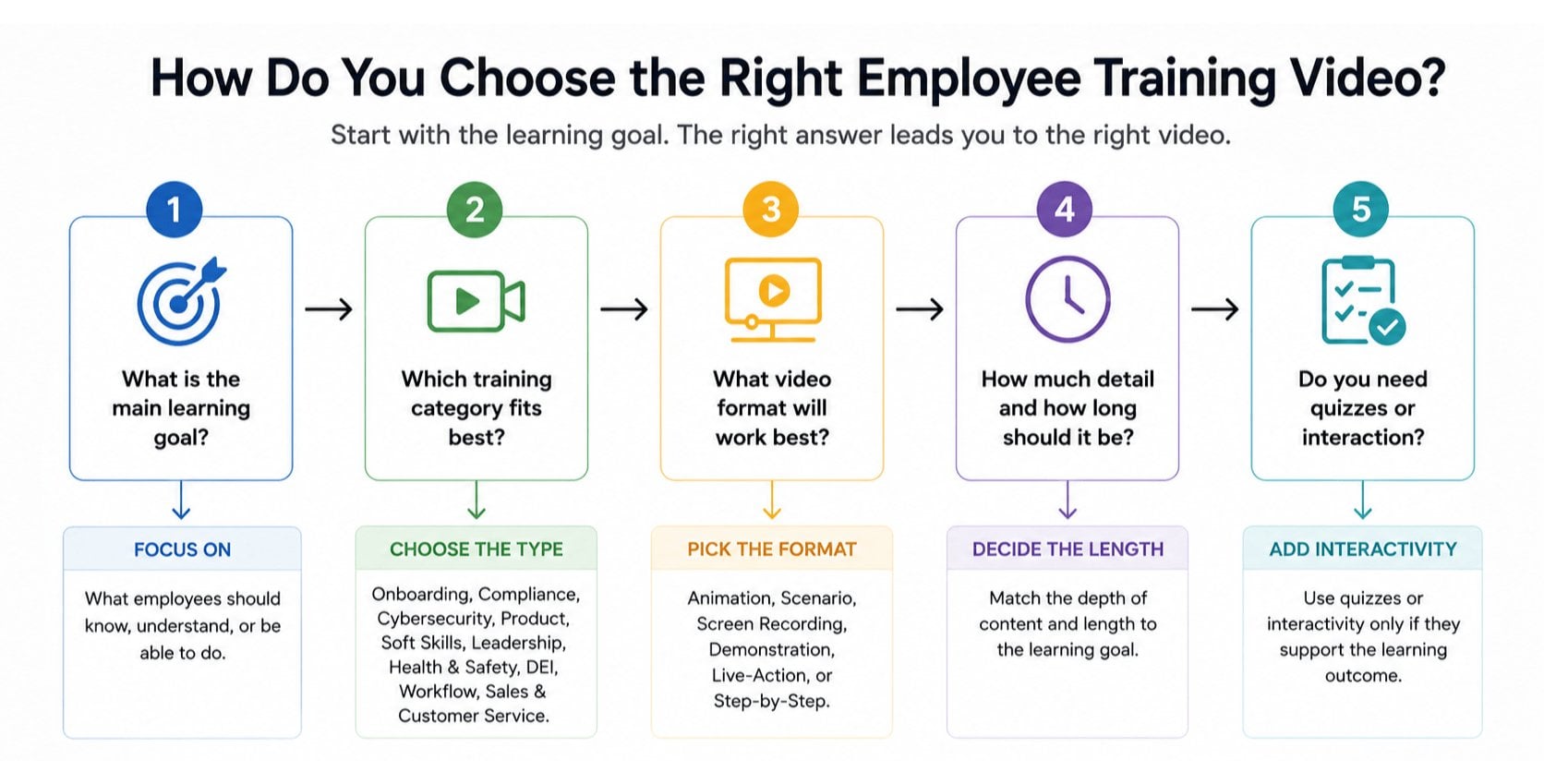
Once you have your main goal, the format becomes much easier to decide. The table below can help you decide.
| Training Goal | Best Video Type |
| Introduce new employees | Onboarding |
| Explain company rules | Compliance |
| Prevent security incidents | Cybersecurity |
| Teach a product or software | Product & Technical |
| Improve communication and interpersonal skills | Soft Skills |
| Develop managers | Leadership & Management |
| Teach safety procedures | Health & Safety |
| Build workplace awareness | DEI |
| Explain internal processes | Process & Workflow |
| Improve customer interactions | Sales & Customer Service |
I usually start with one question: What should the employee be able to do differently after watching this video?
That question also helps determine the production approach. A software tutorial might need a screen recording. A leadership lesson may work better with live-action scenarios. A complicated technical concept could benefit from animation.
It also affects the length, level of detail, and whether you need things like quizzes, knowledge checks, or interactive elements.
Some of you may also struggle with when to start creating training videos for your team.
If this is your concern, read our article about it here: How to Know If You Need Employee Training Videos?
Conclusion: Employee Training Videos Should Help People Do Their Jobs Better
There’s no single training video format that works for every business.
A compliance lesson may need a realistic scenario. A software tutorial may be better as a screen recording.
Leadership training can benefit from showing difficult conversations, while a workflow video may simply need to walk employees through the process step by step.
What matters is choosing the format that makes the information clear and useful for the person watching it.
If you have a complex training topic that’s difficult to explain with slides or documentation, a well-designed explainer video could be a better way to communicate it.
Need help turning your training materials into a video? Breadnbeyond can help you create clear, engaging explainer videos built around what your employees actually need to learn.
FAQs About Types of Employee Training Videos
1. What is an employee training video?
An employee training video is a video created to teach employees specific knowledge, skills, processes, or behaviors they need for their jobs.
2. What are the most common types of employee training videos?
Common types include onboarding, compliance, cybersecurity, product and technical training, soft skills, leadership, safety, DEI, workflow, and customer service or sales training.
3. How long should an employee training video be?
There’s no universal ideal length. The video should be long enough to cover its learning objective without adding unnecessary information. For complex subjects, breaking one long training video into shorter modules can make the content easier to follow.
4. Are animated videos effective for employee training?
Yes. Animation can be particularly useful for explaining abstract, technical, or complex concepts that are difficult to demonstrate with live action.
5. How can companies make training videos more engaging?
Use realistic scenarios, clear storytelling, strong visuals, and a focused learning objective. The goal should be to make the content relevant to the employee, not simply to make the video entertaining.
6. Can employee training videos replace in-person training?
Not always. Videos work well for delivering information, demonstrating processes, and providing refreshers, but some subjects, especially safety-critical or hands-on training, may still require in-person instruction or practical exercises.