
When a client comes to us for an onboarding video, they usually have a folder full of SOPs, slides, policies, and processes, and they want to turn all of it into one video. But, only 29% of new hires say they feel fully prepared and supported after onboarding, according to Gallup.
That number doesn’t surprise me, though. The harder part is figuring out what a new employee actually needs from it.
After working on these projects with different businesses, I’ve found that a good onboarding video needs to be useful first and comprehensive second. Here’s what I think belongs in it.
I’d keep the H3s practical, with your perspective coming through naturally rather than making every section start with “in my experience.”
What Should a Good Employee Onboarding Video Include?
A good onboarding video should help a new employee understand how to get started, what’s expected of them, and where to turn when they get stuck.
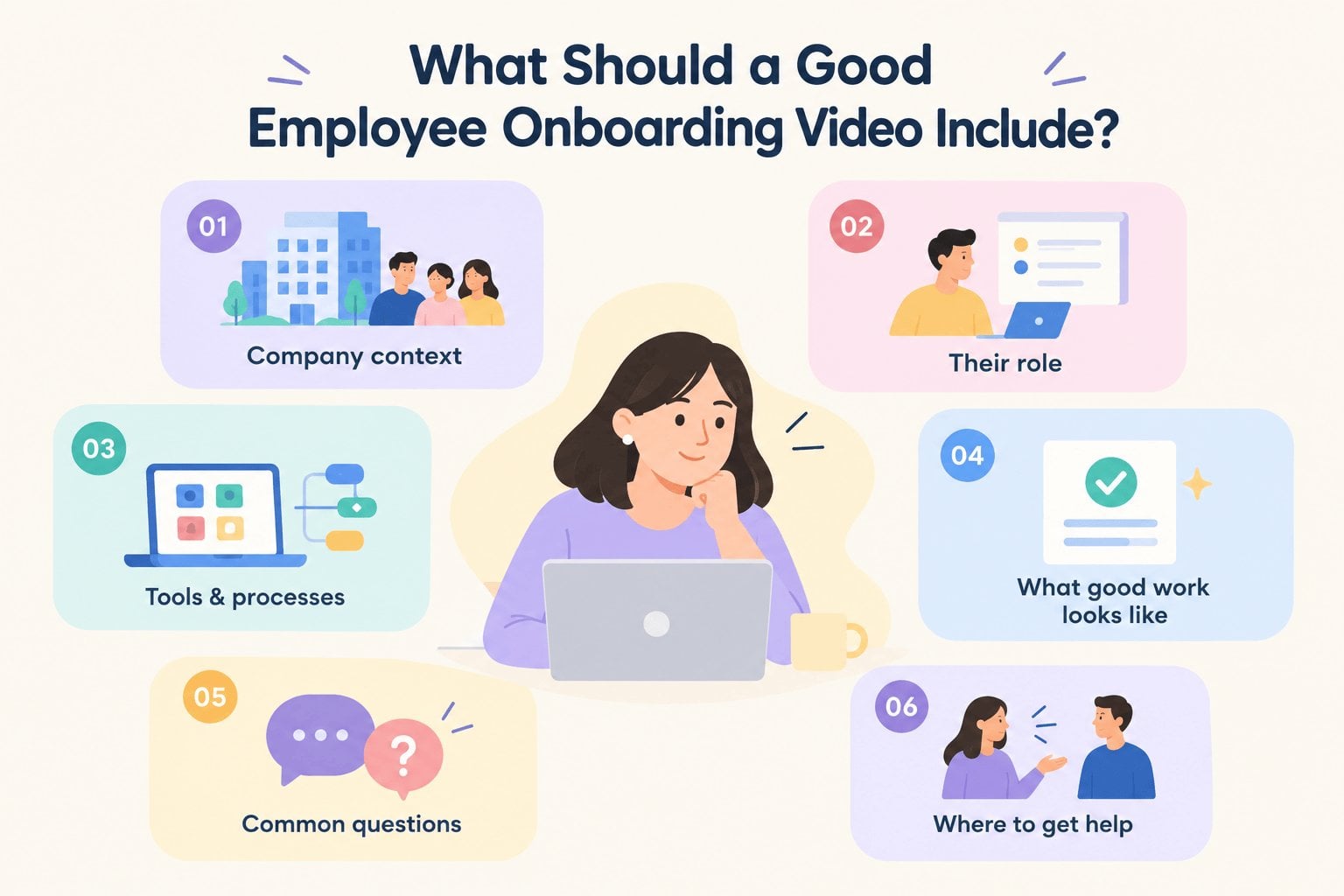
From both sides of the table, as an employer and as someone who creates these videos for other businesses, I’ve found that the most useful content is usually pretty straightforward.
A Clear Introduction to the Company
Start with enough context to help someone understand where they’ve joined. That might include what the company does, who it serves, and a little about how the team works together.
You don’t need to tell the entire company story. A new employee probably doesn’t need a five-minute history lesson about how the business started. Give them the context that helps them understand their place in the organization.
As a business owner, I’d rather a new employee finish the video knowing what the company actually does than remembering a list of milestones from its history.
What Their Role Actually Involves
This is where onboarding videos can become genuinely useful. Explain what the employee is responsible for, what their typical work looks like, and how their role connects with the rest of the team.
For example, if someone joins the sales team, showing the general sales process can be much more useful than simply listing their responsibilities in text.
Keep it practical. New employees are trying to picture themselves doing the job.
The Tools and Processes They’ll Use
Every company has its own collection of software, platforms, forms, and internal workflows. New employees usually have to learn all of them at once.
An onboarding video can give them a quick tour of the essentials before they start figuring things out on their own. This is especially useful for processes that are difficult to explain in a written SOP.
When we create these videos for clients, this is often where visuals do the heavy lifting. A workflow can be much easier to understand when employees can actually see what happens, step by step.
What Good Work Looks Like
Job descriptions explain responsibilities. They don’t always explain expectations.
An onboarding video can show employees what the company considers a good outcome. That could mean how a customer should be handled, how a project moves between departments, or what a finished task should look like.
This part is easy to overlook. It can also save managers from explaining the same expectations repeatedly.
The Things People Usually Ask About
I like looking at this from an employee’s perspective. When you’re new, you don’t always know which questions are worth asking.
Where do I submit this? Who approves it? What happens if something goes wrong? Who should I contact?
These small details can make a new employee’s first few weeks much easier. They don’t necessarily need their own long video either. A short section can be enough.
Where to Go When They Get Stuck
An onboarding video shouldn’t try to solve every possible problem. That’s impossible, especially as a company grows.
Instead, tell employees where to find the answer or who they should ask. That might be their manager, HR team, an internal knowledge base, or a specific department.
I think this is particularly important for businesses creating a whole library of training videos. The goal isn’t to make employees dependent on one video. It’s to give them a useful starting point and a clear path to the next answer.

How Do You Decide What Belongs in an Onboarding Video?
Start with information employees need to do their jobs, avoid common mistakes, and know where to get help. I’d say anything that can be learned more effectively through hands-on practice, a manager, or a reference document doesn’t necessarily need to be in the video.
| Ask yourself | Good fit for video | May be better elsewhere |
| Is it needed on day one? | Login details, reporting lines, first tasks, immediate processes | Less urgent information employees can learn later |
| Does everyone need to know it? | Company basics and information shared across roles | Role-specific details that only certain employees need |
| Do employees keep asking about it? | Frequently repeated explanations and common mistakes | One-off questions or situations that need individual context |
| Can employees learn it by watching? | Basic processes, expectations, and what to do first | Tasks that require practice, feedback, or real-world judgment |
| Will they need to refer back to it? | Key concepts and simple processes | Detailed procedures, policies, and information better suited to a reference document |
Start With What Employees Need on Day One
I’d start with the things that can genuinely get in the way of someone doing their job.
Where do they log in? Who do they report to? What does their first task look like? Which process do they need to follow immediately?
Those details deserve priority because the employee can use them right away. There’s plenty of time to introduce the less urgent stuff later.
This is also something I keep in mind when working with clients. A video doesn’t become better because it contains more information. Sometimes cutting five minutes makes it more useful.
Separate General Information From Role-Specific Training
A new designer and a new accountant probably don’t need the same onboarding experience. Some information should be shared with everyone, while the rest should be relevant to a particular role or department.
I usually think of these as two layers. The first gives employees a common understanding of the company and how it operates. The second gets more specific about the work they’ll actually be doing.
That distinction can also make production easier. Instead of creating one enormous video, you can build a small collection of focused videos that different employees can watch when they need them.
Turn Repeated Questions Into Training Content
One of the easiest ways to figure out what deserves a video is to pay attention to the questions employees keep asking.
If managers repeatedly explain the same process to every new hire, that’s a good candidate. If an employee regularly makes the same mistake because a process is unclear, that’s another.
As a business owner, I know how much time those little explanations can add up to. And from the production side, these are often some of the most useful videos we make because they solve a specific problem instead of trying to cover everything.
Leave Room for Hands-On Learning
A video can explain a process. It can’t replace actually doing the work.
Some things are better learned by trying them, making a mistake, getting feedback, and trying again. That’s especially true for jobs involving customers, equipment, complex software, or decisions that depend on context.
So I wouldn’t try to squeeze an entire training program into an onboarding video. Use the video to establish the basics, then let managers, teammates, and real work take over from there.
That balance matters. The video should make the first attempt easier and not pretend it can do the whole job.
When Should New Employees Watch an Onboarding Video?
An onboarding video doesn’t have to be a one-time assignment on someone’s first day. I prefer treating it as a resource employees can watch before they start, during their first week, or whenever they need a quick refresher.
For example, a company overview might make sense before Day One, while a software walkthrough is more useful when the employee is ready to use that tool. Role-specific training can come later, once they understand the basics.
That timing can make a bigger difference than adding more information to the video itself. Give people the right information when they can actually use it.
Make Your First Impression Count
Your onboarding video is often one of the first pieces of company content a new employee encounters. It sets a tone before they’ve had a chance to figure out how your workplace operates for themselves.
At Breadnbeyond, we help businesses turn their internal knowledge into clear, engaging training and onboarding videos. Here are some of the training and onboarding videos we’ve crafted:
Whether you need to explain a complicated process, introduce a new team member to your company, or create a video employees can keep coming back to, we can help shape the content and production around the way your business actually works.
A good video should feel like it belongs to your company. That’s what we aim to create.
Frequently Asked Questions Employee Onboarding Videos
Can onboarding videos be personalized for different employee levels?
Yes. A new manager may need a different context from an entry-level employee, even if they work in the same department. You can create variations based on seniority, responsibilities, location, or access level.
Should onboarding videos include quizzes or assessments?
They can, especially when employees need to demonstrate that they understood important material. For less critical information, a simple confirmation or follow-up activity may be enough.
Can onboarding videos be used for existing employees?
Definitely. They can be useful when employees move into new positions, take on additional responsibilities, or need to learn a newly introduced system or procedure.
How often should an onboarding video be updated?
Review it whenever there is a meaningful change to the information it contains. A scheduled review every six to twelve months can also help catch outdated details before they become a problem.
Should onboarding videos have subtitles?
I’d recommend them. Subtitles make videos easier to follow in shared workspaces, help employees who prefer reading along, and make the content more accessible across different situations.