
Avoid overspending on an explainer video by keeping the message focused, approving the script early, limiting unnecessary revisions, and spending the budget on clarity instead of creative excess.
Sometimes, there’s a moment in an explainer video project where logic quietly leaves the room. Usually around revision round four. Somebody wants more scenes in a 60-second video, somebody else wants the animation to feel “more inspiring,” and then comes the classic line: “It shouldn’t affect the budget too much, right?”
That’s usually how a simple project turns into endless revisions, too many opinions, and debates over details nobody noticed in the first version. So in this article, I’ll share a few budget traps and simple ways to avoid wasting money because, in this economy, every saved dollar deserves respect.
Why Explainer Video Budgets Spiral So Fast?
Most explainer video projects don’t go over budget because of one giant mistake. It’s usually a collection of small decisions that seem harmless at first, then slowly turn a simple project into a surprisingly expensive one.
Overspending isn’t unique to video production, though. Research from TeamStage found that 70% of projects experience cost overruns in general, which explains why creative projects can spiral quickly without clear direction early on.
Skipping the Planning Part
A lot of overspending happens before animation even starts.
Companies rush into production before agreeing on the audience, messaging, or goal of the video. That confusion eventually shows up as revisions, delays, and long meetings nobody enjoys.
Good planning feels slower at the beginning, but it prevents expensive chaos later. You might learn some hidden costs that some explainer video production companies didn’t mention at first, or discover that a simpler approach would communicate the message more clearly and cost far less: What Should You Know About Explainer Video Hidden Costs.
Trying to Say Everything in One Video
A company starts with a simple goal, then suddenly the video becomes a product demo, company profile, investor pitch, feature breakdown, and motivational speech about innovation.
The problem is that every extra message adds more scenes, more revisions, and more production time. Ironically, shorter and more focused videos usually work better anyway.
Too Many Decision-Makers
One person gives feedback. Five people create a survival challenge for the creative team.
Marketing wants the video modern. Sales wants more features. The founder wants it emotional. Then somebody appears with unexpected opinions about fonts.
The easiest way to control costs is keeping the decision-makers small and aligned early.
Changing the Script Midway
Changing the script after production starts is where budgets begin doing gymnastics.
Animation relies heavily on planning, so even a small script change can affect visuals, timing, video voiceover, and scene structure. What feels like a tiny edit can easily create hours of extra work.
That’s why locking the script early saves a lot of money and stress later.
How to Avoid Wasting Money on an Explainer Video Production?
Most explainer video budgets can stay perfectly reasonable with a little planning and a few smart decisions early on. The goal isn’t making the cheapest video possible. It’s making sure the money actually goes into things that improve the final result instead of funding unnecessary chaos.
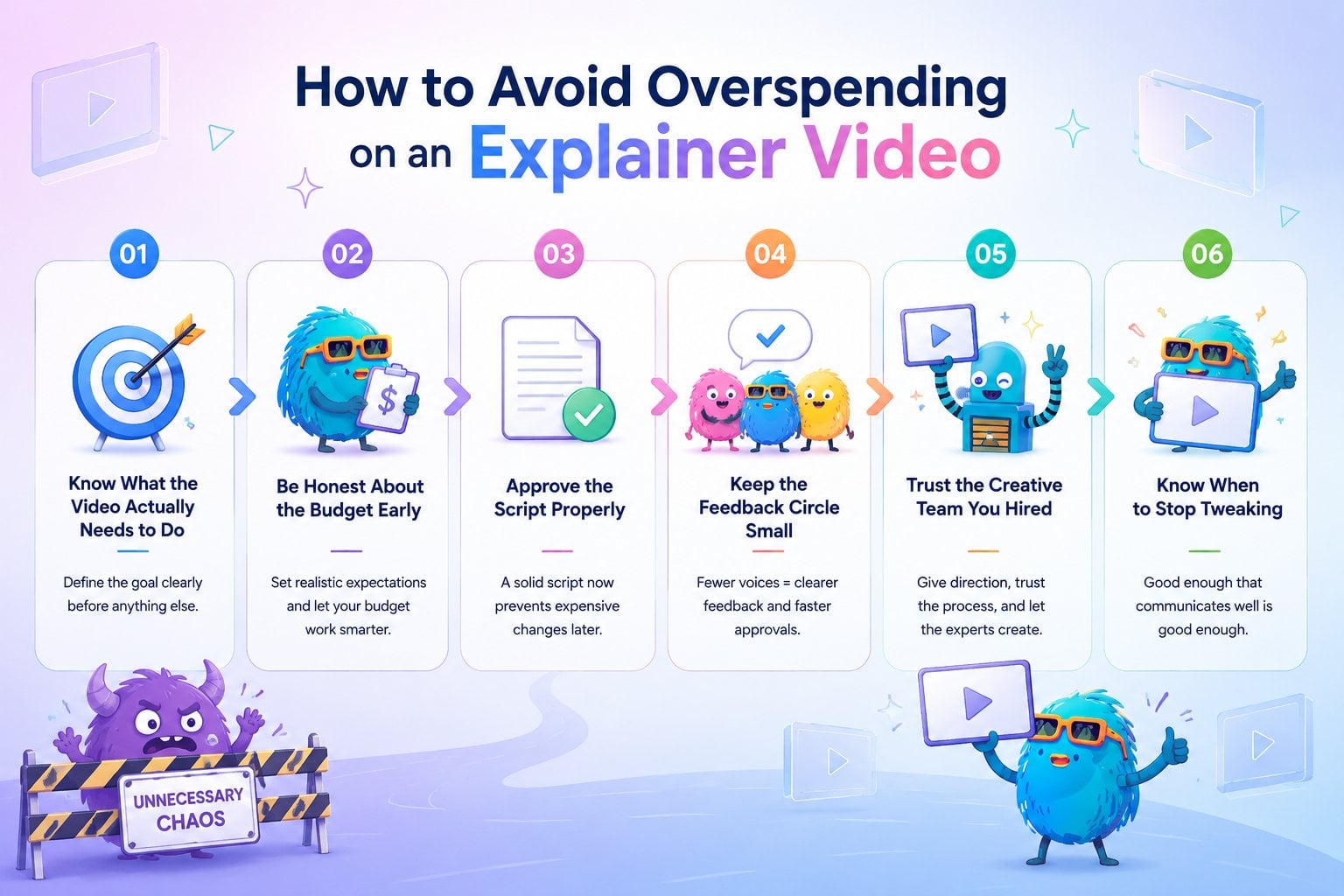
Know What the Video Actually Needs to Do
Before discussing animation styles, transitions, or background music, figure out the actual purpose of the video.
Is it explaining a product? Getting demo signups? Introducing a service? Making investors understand the business faster?
A surprising amount of wasted budget comes from projects trying to achieve five different goals at once. Clear goals usually lead to clearer videos, faster approvals, and fewer expensive detours later.
Be Honest About the Budget Early
One of the fastest ways to waste time is pretending the budget is bigger than it actually is. Great video production doesn’t always require massive budgets.
A lot of companies are creating effective videos without spending like a streaming platform launching a fantasy series. Nearly half of companies spent under $5,000 on video production in 2025 (Wistia Report, 2025).
Good studios can usually recommend smart ways to maximize the budget, but that only works when expectations are realistic from the beginning. If the budget supports a clean and effective 2D explainer, there’s no reason to force cinematic 3D scenes into the conversation like everybody’s pitching the next animated blockbuster.
Clear communication about budget early on saves everybody from awkward surprises later.
Approve the Script Properly
A rushed script approval is basically a future invoice with good posture.
The explainer script controls everything. Timing, visuals, voiceover, pacing, scene count, all of it starts there. So if people are still unsure about messaging, this is the stage to fix it.
Once animation begins, script edits become significantly more expensive than they look on paper.
Keep the Feedback Circle Small
The bigger the feedback group, the stranger the project becomes.
One person wants the video shorter. Another wants more details. Somebody else suddenly decides the tone should feel “more futuristic.”
A small decision-making team keeps feedback consistent and prevents endless creative ping-pong between departments.
Trust the Creative Team You Hired
This part sounds obvious, but it matters a lot. If a company hires a creative team whose work they already like, there’s no need to micromanage every frame afterward.
Some of the smoothest projects happen when clients give clear direction, trust the process, and avoid redesigning the video every other Tuesday.
Good creative teams usually know how to make something look strong without wasting budget on unnecessary complexity.
Know When to Stop Tweaking
There’s a dangerous phase in every project where the video is already good, but people keep changing things because the file still exists.
A word gets replaced. A scene moves two seconds earlier. Somebody asks for different music after approving the previous one three times. At some point, the improvements become microscopic while the costs keep growing normally.
A good explainer video doesn’t need to achieve cinematic perfection. It just needs to communicate clearly and do its job well.
What Do Clients Usually Overspend On?
A lot of clients assume the budget should go toward making the video look more impressive. In reality, the best-performing explainer videos are usually the clearest ones, not the busiest ones.
One of the funniest things about this industry is how often teams spend days debating details that the audience forgets in five seconds. Meanwhile, the videos that actually perform well are usually the simple ones that explain things clearly and get to the point before people open another tab.
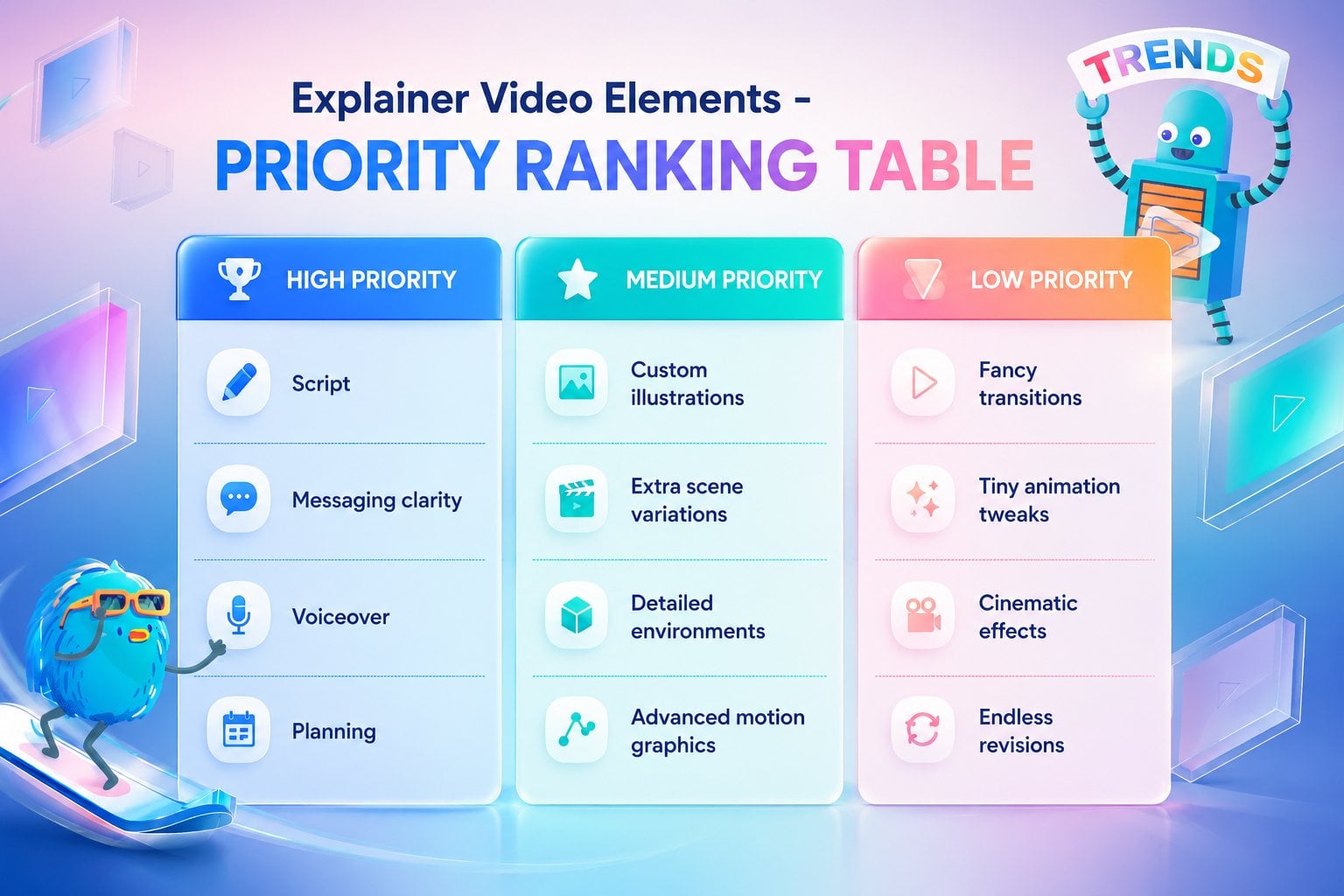
Things actually worth spending money on:
- A strong script
- Clear messaging
- Good pacing
- Solid voiceover talent
- Smart creative direction
- Pre-production and planning
Things clients often overspend on:
- Endless revision rounds
- Overcomplicated animation
- Extra scenes nobody asked for
- Trying to fit every feature into one video
- Tiny visual tweaks most viewers will never notice
- Making the video “cinematic” for no practical reason
A Final Thought Before You Spend the Entire Marketing Budget
The companies that get the most value out of explainer videos are usually the ones that stay realistic about what the video actually needs to accomplish. Once the goal is clear, everything else becomes much easier, including the budget conversations.
That approach has always mattered to us at Breadnbeyond. We’re big fans of creative ideas, but we’re even bigger fans of videos that actually help businesses communicate better without turning production into a six-month emotional journey for everybody involved.
If you’re planning an explainer video and want a team that understands both the creative side and the budgeting reality, Breadnbeyond would be happy to help!
Mini FAQ About Explainer Video Overspending
How long should an explainer video be?
Most explainer videos work best between 60 to 90 seconds. Long enough to explain the idea, short enough to keep people from checking their notifications halfway through. Learn more about The Ideal Explainer Video Duration.
Is custom animation always necessary?
Not always. A strong concept and clear execution usually matter more than making every visual element completely custom from scratch.
Does background music really matter?
More than people think. Good music quietly improves pacing and energy. Bad music makes the whole video feel strangely uncomfortable for reasons nobody can explain.
Should one explainer video target multiple audiences?
Usually no. Trying to speak to customers, investors, new hires, and distributors in one video often makes the message weaker for everybody.
What’s one sign an explainer video project is going off track?
When the project starts collecting phrases like “while we’re at it” or “can we also add this real quick?” Those six words have launched many unnecessary revision rounds into orbit.