
Table of Contents ×
- 1 Why Can Training Video Mistakes Become So Costly?
- 2 What Are the Most Costly Mistakes When Creating Training Videos?
- 2.1 1. Starting Without a Clear Learning Objective
- 2.2 2. Cramming Too Much Into One Video
- 2.3 3. Turning Training Materials Into a Script Word-for-Word
- 2.4 4. Making the Video Longer Than Necessary
- 2.5 5. Choosing Visuals That Don’t Support the Lesson
- 2.6 6. Forgetting Who the Video Is For
- 2.7 7. Skipping Testing Before Launch
- 2.8 8. Creating Content That’s Difficult to Update
- 2.9 9. Spending More on Production Than Learning
- 3 How Can You Avoid Costly Training Video Mistakes?
- 4 Conclusion: What Makes a Training Video Worth the Investment?
- 5 FAQs About Training Video Mistakes
Training video mistakes can cost more than a few extra hours in the editing room.
A confusing script, unnecessary scenes, or outdated information can mean more revisions, higher production costs, and a training video that employees simply don’t learn from.
I’m sure that small decisions early in production can create much bigger problems later.
So, I always treat the learning objective, audience, and structure as seriously as the visuals themselves.
I’ll walk through the most common training video mistakes, why they can become costly, and what you can do to avoid them.
Why Can Training Video Mistakes Become So Costly?
A training video mistake rarely stays limited to the video itself. If the script is unclear, you may need additional revisions. If the information is outdated, you may have to re-record or reanimate entire sections.
And if employees can’t follow the lesson, the company may end up spending more time and resources reinforcing the same training.
From my experience producing training and explainer videos, the most expensive mistakes are often the ones that happen before production even begins, such as pictured below:
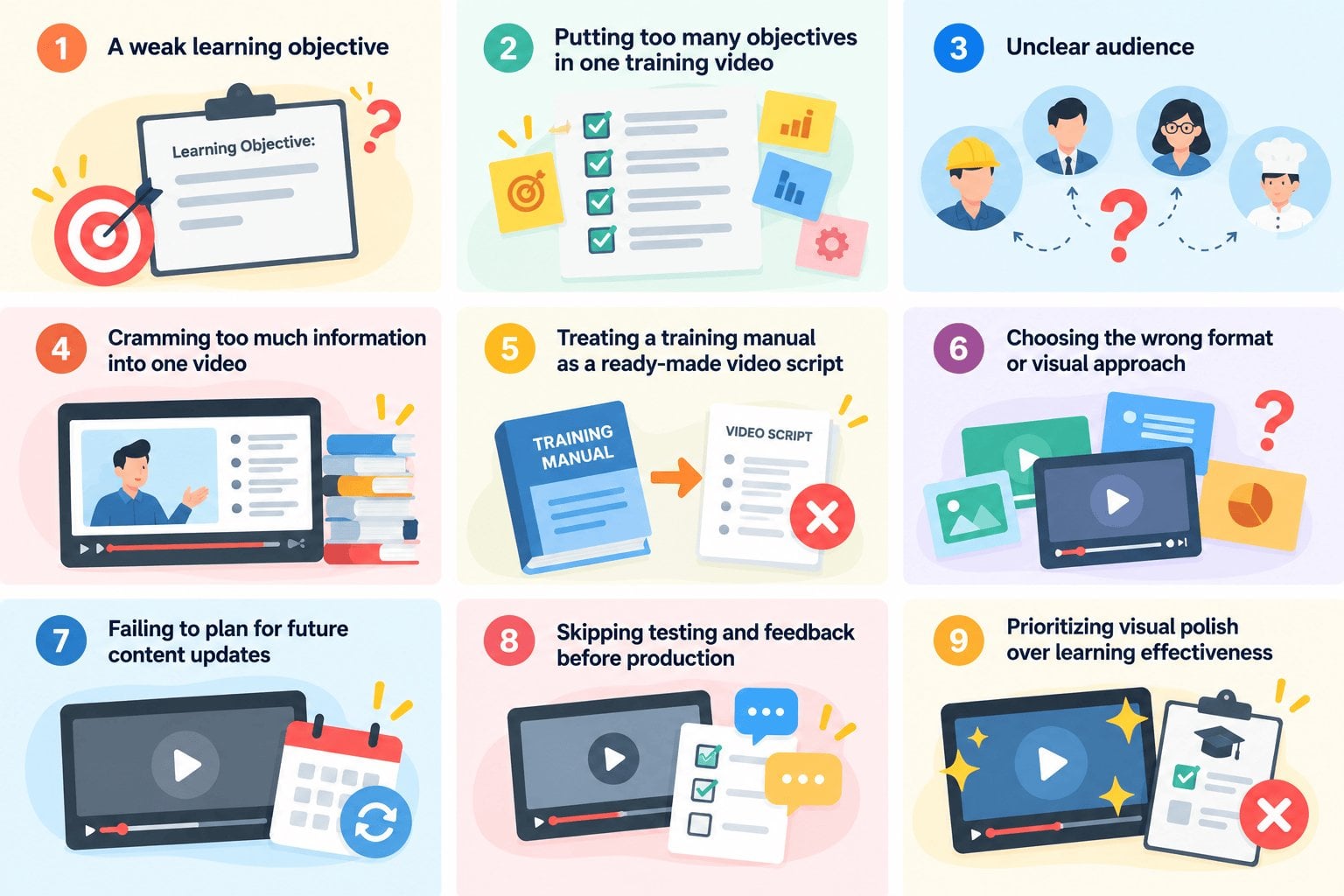
A poorly planned structure can affect everything that follows, from the script and storyboard to animation, voiceover, and final editing.
And the stakes are real. CIPD’s 2026 research found that 48% of employers have increased their efforts to develop talent in-house over the past year.
In short, it shows how important employee development has become for businesses.
When companies are putting more resources into training, creating content that employees can’t understand, remember, or apply can quickly turn into wasted time and money.
What Are the Most Costly Mistakes When Creating Training Videos?
Training videos can become costly when the content is unclear, too dense, poorly structured, or difficult for employees to apply. These problems often start long before animation or editing begins. When the foundation is weak, every production step that follows becomes harder and more expensive.
1. Starting Without a Clear Learning Objective
I always start by asking one simple question: what should employees know or be able to do after watching this video?
Without a clear answer, it’s easy to keep adding information that doesn’t actually support the training goal.
This can make the script longer, the visuals more complicated, and the revision process much more time-consuming.
2. Cramming Too Much Into One Video
I’ve seen training content become difficult to follow simply because too much information is packed into a single video.
When employees have to process several concepts, procedures, or instructions at once, the main lesson can easily get lost.
I prefer breaking complex topics into shorter, focused modules when each section has a different learning objective.
3. Turning Training Materials Into a Script Word-for-Word
A training manual, SOP, or presentation isn’t automatically a good video script.
When I turn written materials into video content, I usually have to simplify the language, remove unnecessary details, and think about what can be shown instead of explained.
Reading a document word-for-word can make the narration feel dense and formal, while a conversational script gives employees a much easier way to follow the lesson.
Check out our cheat sheet on writing effective video scripts: Explainer Video Script Cheatsheet [Infographic]
4. Making the Video Longer Than Necessary
I don’t think a training video becomes more effective just because it covers more information.
The longer a video gets, the easier it is for employees to lose focus or stop watching before the lesson is complete.
When reviewing a script, I look for repeated explanations, unnecessary examples, and information that doesn’t directly support the learning objective.
5. Choosing Visuals That Don’t Support the Lesson
Not every training topic needs the same visual treatment.
I’ve found that generic stock footage or static slides can make a video feel disconnected from what employees actually need to learn.
I might use animation to explain a concept, screen recordings to demonstrate software, live-action footage for physical procedures, or a combination of different formats to make the lesson easier to understand.
Learn how to make effective training videos through examples I personally hand-picked here: 25 Effective Training Video Examples
6. Forgetting Who the Video Is For
I always consider who will actually watch the training before deciding how the content should be presented.
A new employee may need more context and step-by-step guidance, while an experienced employee may only need a quick refresher.
The video should reflect their role, experience level, and real-world situations rather than simply covering everything the trainer wants to explain.
7. Skipping Testing Before Launch
I prefer testing a training video with a small group before rolling it out to everyone.
Early feedback can reveal confusing explanations, awkward pacing, or important information that employees still don’t understand.
Fixing these issues at this stage is much easier than discovering them after the video has already been launched.
8. Creating Content That’s Difficult to Update
Training content can become outdated faster than expected, especially when it covers software, company policies, or internal procedures.
I try to plan for these changes during production by breaking content into modular sections that can be updated independently.
I also avoid adding unnecessary time-sensitive details when they aren’t essential to the lesson.
9. Spending More on Production Than Learning
A polished training video can look impressive without actually helping employees learn.
I’ve always believed that production quality should support the lesson, not compete with it.
Clear explanations, useful visuals, and strong instructional structure matter more than adding expensive effects or visuals that don’t improve understanding.
How Can You Avoid Costly Training Video Mistakes?
The best way to avoid costly training video mistakes is to make key decisions before production begins. I usually focus on the learning objective, the audience, the structure, and how the content will be delivered before thinking about animation or other video production processes.
Start With a Clear Learning Objective
Before writing the script, define what employees should know or be able to do by the end of the video. A clear outcome gives the production team a useful filter for deciding what belongs in the script and what can be removed.
Keep Each Video Focused
Trying to cover too much in one video can make the material harder to follow. Give each video one clear purpose, then break larger subjects into shorter modules when they involve several learning objectives.
Write Specifically for Video
A training manual or presentation should not be treated as a finished video script. Written material often needs to be reworked for spoken narration, with complex explanations simplified and unnecessary detail removed.
The visuals can also carry some of the information. When an action, process, diagram, or example can be shown clearly on screen, there is less reason to explain every detail through voiceover.
Match Visuals to the Learning Material
The right visual format depends on what employees need to understand. Animation can help simplify abstract or complex concepts, while screen recordings, demonstrations, or live action may work better when employees need to follow a specific process.
Rather than choosing a style because it looks appealing, match the format to the learning objective.
Test Before Launching
Even clear explanations can reveal problems once someone outside the production process watches the video. Testing it with a small group before a wider rollout can uncover confusing sections, pacing issues, or missing information.
Feedback from actual learners is especially useful because it shows whether the content works from the employee’s perspective.
Plan for Future Updates
Software, policies, and internal procedures can change after a video is published. Building the content in modular sections makes those updates easier to manage.
If one process changes later, you can update the relevant section without recreating the entire training video. Planning for that flexibility during production can save considerable time and cost down the road.
Conclusion: What Makes a Training Video Worth the Investment?
A training video is worth the investment when it helps employees understand and apply what they’re supposed to learn without creating unnecessary production or training costs.
It means starting with a clear objective, keeping the content focused, choosing visuals that support the lesson, and, if possible, making the video easy to update.
I always look at the learning experience alongside the production itself.
A well-planned video can reduce revisions and give employees a clear training resource they can return to when they need it.
At Breadnbeyond, we help businesses turn complex information into clear, engaging animated training videos. If you’re planning a training video and want to avoid costly production mistakes, get in touch with our team to discuss your project.
FAQs About Training Video Mistakes
1. What is the most common training video mistake?
One of the most common mistakes is creating a video without a clear learning objective. Without one, the content can become too broad, making the video longer and harder for employees to follow.
2. How long should a training video be?
There isn’t one ideal length for every training video. I usually recommend keeping each video focused on a specific learning objective and splitting more complex training into shorter modules when necessary.
3. Should training videos use animation or live action?
It depends on what employees need to learn. Animation can work well for explaining concepts and processes, while live action or demonstrations may be more effective for physical procedures. Screen recordings are often useful for software training.
4. How can I make a training video easier to update?
I recommend a modular structure so you can replace individual sections without recreating the entire video. It’s also useful to avoid unnecessary details that are likely to become outdated, particularly when covering software, policies, or procedures.
5. How do you know if a training video is effective?
I look beyond production quality and ask whether employees can understand, remember, and apply the information. Testing the video with a small group before launch can also reveal confusing explanations, pacing issues, or missing information.